

a. Mobile
b. Desktop
a. Rectangle
b. Line
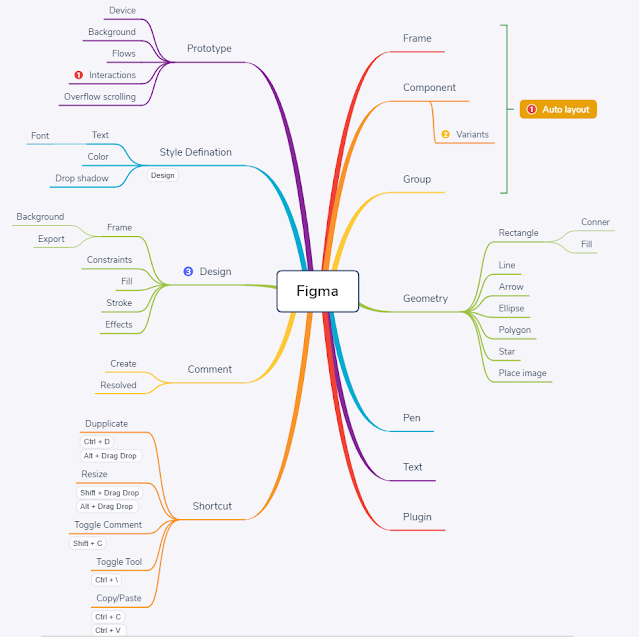
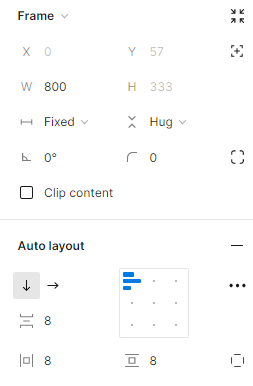
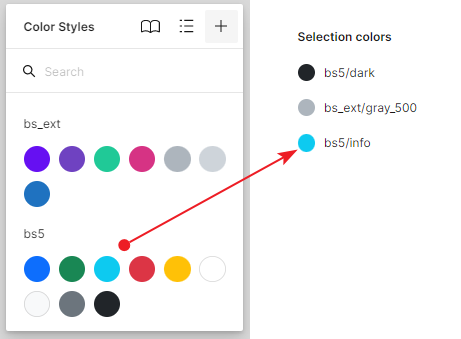
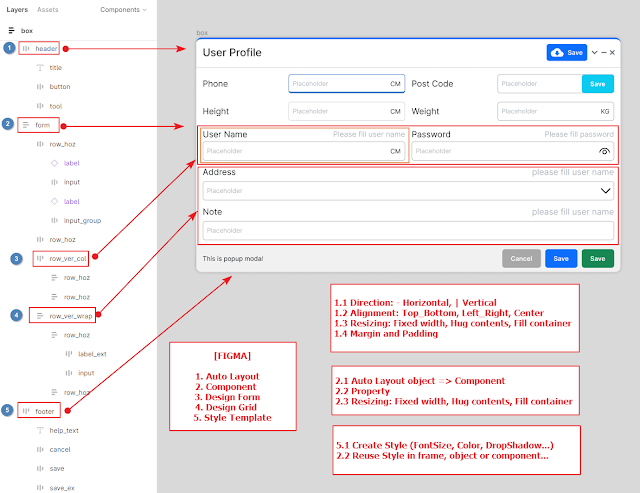
Count down 365 application support calculate distance between today date to selected date, support highlight Vietnam holidays, find lunar date, calculate total work days in month.
New UI (Send email to receive App)


The application support "Upload/Download" file use hosting application in IIS Web Server (.NET 5)
You can "Upload/Download" file from computer to your mobile device (same Wifi Transfer)
Download .NET 5 Runtime at here
Download Hosting Bundle at here
1. Login Screen

2. Main Screen: click on folder and click on file to Download

3. Main Screen Upload

4. Mobile Screen: you can access IIS Website on mobile to Download files

 |
| Drag drop file to execute convert |
using System;
using System.IO;

namespace Base64Converter
{
    public class ConvertToBase64
    {
        private readonly string _file;

        private ConvertToBase64(string file)
        {
            _file = file;
        }

        private void Parse()
        {
            try
            {
                var bytes = File.ReadAllBytes(_file);
                var base64String = Convert.ToBase64String(bytes);
                var base64Path = Utils.GetFileName(_file + ".base64");
                File.WriteAllText(base64Path, _file + Environment.NewLine);
                File.AppendAllText(base64Path, base64String);
                Logger.Write("Base64 File: {0}", base64Path);
            }
            catch (Exception ex)
            {
                Logger.Error(ex.Message, ex);
            }
        }
        public static void Parse(string file)
        {
            var converter = new ConvertToBase64(file);
            converter.Parse();
        }
    }
}
using System;
using System.IO;

namespace Base64Converter
{
    public class ConvertToFile
    {
        private readonly string _file;

        private ConvertToFile(string file)
        {
            _file = file;
        }

        private void Parse()
        {
            try
            {
                var allLines = File.ReadAllLines(_file);
                var filePath = _file.Substring(0, _file.Length - 7);
                var base64String = string.Empty;
                switch (allLines.Length)
                {
                    case 1:
                        base64String = allLines[0];
                        break;
                    case 2:
                        filePath = Utils.GetFileName(allLines[0]);
                        base64String = allLines[1];
                        break;
                    default:
                        base64String = string.Join(string.Empty, allLines);
                        break;
                }

                var bytes = Convert.FromBase64String(base64String);
                File.WriteAllBytes(filePath, bytes);
                Logger.Write("File: {0}", filePath);
            }
            catch (Exception ex)
            {
                Logger.Error(ex.Message, ex);
            }
        }

        public static void Parse(string file)
        {
            var converter = new ConvertToFile(file);
            converter.Parse();
        }
    }
}
 |
| Help to use |
_bgHelper.AddDoWork(OnDowork).AddRunWorkerCompleted(OnCompleted)
    .AddReportProgressChanged(OnReportProgress).SupportCancellation().DoWork();
private void OnDowork(object sender, DoWorkEventArgs e)
{
    if (_bgHelper.CancellationPending)
    {
        e.Cancel = true;
        return;
    }
    //TODO: Working progress
}
private void OnReportProgress(object sender, ProgressChangedEventArgs e)
{
    //TODO: Report progress on working
}
private void OnCompleted(object sender, RunWorkerCompletedEventArgs e)
{
    //TODO: Working completed
}
using System;
using System.ComponentModel;

namespace App.Helpers
{
    /// <summary>
    /// Class BackgroundWorkerHelper.
    /// Support execute action on background thread
    /// </summary>
    public class BackgroundWorkerHelper : IDisposable
    {
        #region Private variable
        /// <summary>
        /// The _added event do work
        /// </summary>
        private bool _addedEventDoWork;
        /// <summary>
        /// The _added event run worker completed
        /// </summary>
        private bool _addedEventRunWorkerCompleted;
        /// <summary>
        /// The _worker
        /// </summary>
        private BackgroundWorker _worker;

        /// <summary>
        /// The _on do work event handler
        /// </summary>
        private DoWorkEventHandler _onDoWorkEventHandler;
        /// <summary>
        /// The _on report progress changed
        /// </summary>
        private ProgressChangedEventHandler _onReportProgressChanged;
        /// <summary>
        /// The _on completed event handler
        /// </summary>
        private RunWorkerCompletedEventHandler _onCompletedEventHandler;

        public bool CancellationPending
        {
            get
            {
                return _worker != null && _worker.CancellationPending;
            }
        }
        #endregion

        #region Constructors
        /// <summary>
        /// Initializes a new instance of the <see cref="BackgroundWorkerHelper"/> class.
        /// </summary>
        public BackgroundWorkerHelper() : this(new BackgroundWorker())
        {

        }
        /// <summary>
        /// Initializes a new instance of the <see cref="BackgroundWorkerHelper"/> class.
        /// </summary>
        /// <param name="worker">The worker.</param>
        public BackgroundWorkerHelper(BackgroundWorker worker)
        {
            _worker = worker;
        }
        #endregion

        #region Public functions
        /// <summary>
        /// Adds the DoWork event.
        /// </summary>
        /// <param name="onDoWorkEvent">The on do work event.</param>
        /// <returns>BackgroundWorkerHelper.</returns>
        public BackgroundWorkerHelper AddDoWork(DoWorkEventHandler onDoWorkEvent)
        {
            ReleaseEventHandler(); //Remove dupplicate event handler
            _addedEventDoWork = true;
            _onDoWorkEventHandler = onDoWorkEvent;
            _worker.DoWork += OnDoWork;
            return this;
        }

        /// <summary>
        /// Adds the ReportProgressChanged event.
        /// </summary>
        /// <param name="onReportProgressChanged">The on report progress changed.</param>
        /// <returns>BackgroundWorkerHelper.</returns>
        public BackgroundWorkerHelper AddReportProgressChanged(ProgressChangedEventHandler onReportProgressChanged)
        {
            _worker.WorkerReportsProgress = true;
            _onReportProgressChanged = onReportProgressChanged;
            _worker.ProgressChanged += OnProgressChanged;
            return this;
        }

        /// <summary>
        /// Adds the RunWorkerCompleted event.
        /// </summary>
        /// <param name="onRunWorkerCompleted">The on run worker completed.</param>
        /// <returns>BackgroundWorkerHelper.</returns>
        public BackgroundWorkerHelper AddRunWorkerCompleted(RunWorkerCompletedEventHandler onRunWorkerCompleted)
        {
            _addedEventRunWorkerCompleted = true;
            _onCompletedEventHandler = onRunWorkerCompleted;
            return this;
        }

        /// <summary>
        /// Supports the cancellation.
        /// </summary>
        /// <returns>BackgroundWorkerHelper.</returns>
        public BackgroundWorkerHelper SupportCancellation()
        {
            _worker.WorkerSupportsCancellation = true;
            return this;
        }

        /// <summary>
        /// Does the work.
        /// </summary>
        /// <param name="obj">The object.</param>
        public void DoWork(object obj = null)
        {
            if (_addedEventDoWork)
            {
                _worker.RunWorkerCompleted += OnRunWorkerCompleted;
                _worker.RunWorkerAsync(obj);
            }
        }

        /// <summary>
        /// Cancels this instance.
        /// </summary>
        public void Cancel()
        {
            if (_worker.WorkerSupportsCancellation)
            {
                if (_worker.IsBusy)
                {
                    _worker.CancelAsync();
                }

                //Release all event handler when cancel
                ReleaseEventHandler();
            }
        }

        /// <summary>
        /// Determines whether this instance is busy.
        /// </summary>
        /// <returns><c>true</c> if this instance is busy; otherwise, <c>false</c>.</returns>
        public bool IsBusy()
        {
            return _worker != null && _worker.IsBusy;
        }
        #endregion

        #region Private functions
        /// <summary>
        /// Handles the <see cref="E:DoWork" /> event.
        /// </summary>
        /// <param name="sender">The sender.</param>
        /// <param name="args">The <see cref="DoWorkEventArgs"/> instance containing the event data.</param>
        private void OnDoWork(object sender, DoWorkEventArgs args)
        {
            _onDoWorkEventHandler(sender, args);
        }
        /// <summary>
        /// Handles the <see cref="E:ProgressChanged" /> event.
        /// </summary>
        /// <param name="sender">The sender.</param>
        /// <param name="args">The <see cref="ProgressChangedEventArgs"/> instance containing the event data.</param>
        private void OnProgressChanged(object sender, ProgressChangedEventArgs args)
        {
            _onReportProgressChanged(sender, args);
        }
        /// <summary>
        /// Handles the <see cref="E:RunWorkerCompleted" /> event.
        /// </summary>
        /// <param name="sender">The sender.</param>
        /// <param name="args">The <see cref="RunWorkerCompletedEventArgs"/> instance containing the event data.</param>
        private void OnRunWorkerCompleted(object sender, RunWorkerCompletedEventArgs args)
        {
            if (args.Error != null)
            {
                //TODO: Write Error Log
            }
            if (_onCompletedEventHandler != null)
            {
                _onCompletedEventHandler(sender, args);
            }
            //Release all registered event handler when completed
            ReleaseEventHandler();
        }
        /// <summary>
        /// Releases the event handler.
        /// </summary>
        private void ReleaseEventHandler()
        {
            if (_addedEventDoWork)
            {
                _worker.DoWork -= OnDoWork;
                _onDoWorkEventHandler = null;
                _addedEventDoWork = false;
            }
            if (_worker.WorkerReportsProgress)
            {
                _worker.ProgressChanged -= OnProgressChanged;
                _onReportProgressChanged = null;
                _worker.WorkerReportsProgress = false;
            }
            if (_addedEventRunWorkerCompleted)
            {
                _worker.RunWorkerCompleted -= OnRunWorkerCompleted;
                _onCompletedEventHandler = null;
                _addedEventRunWorkerCompleted = false;
            }
        }
        #endregion

        #region Disposable
        public void Dispose()
        {
            Dispose(true);
            GC.SuppressFinalize(this);
        }

        private void Dispose(bool disposing)
        {
            if (disposing)
            {
                if (_worker != null)
                {
                    _worker.Dispose();
                    _worker = null;
                }
            }
        }
        ~BackgroundWorkerHelper()
        {
            Dispose(false);
        }
        #endregion
    }
}


